Labrix
Labrix is an AI workspace for food scientists and R&D teams. Its assistant, Pickle, answers questions about food regulations, formulation and R&D workflows, next to a set of formulation and analysis tools. I led the redesign of its UI structure and navigation.
- Role
- UI structure and navigation redesign
- Platform
- Web app
- Users
- Food scientists and R&D teams
- Product
- AI SaaS
What problem does Labrix solve?
Food R&D work is spread across many tools: regulation lookups, formulation spreadsheets, sensory and cost analysis, market research. Labrix brings them into one workspace with an assistant that understands food science, so a team stops switching between a dozen tabs.
The design problem was clarity. An AI product that does many things has to make it obvious, within seconds, what to do first and where past work lives.
How is the product structured?
- Two modes in the sidebar: Ask, for conversations with Pickle, and Food R&D, where "New chat" becomes "New project".
- Ask: a chat with a tools menu grouped into Compliance, R&D, Analysis and Search, a choice of reasoning depth (Fast, Analytical or Research) and starter suggestions.
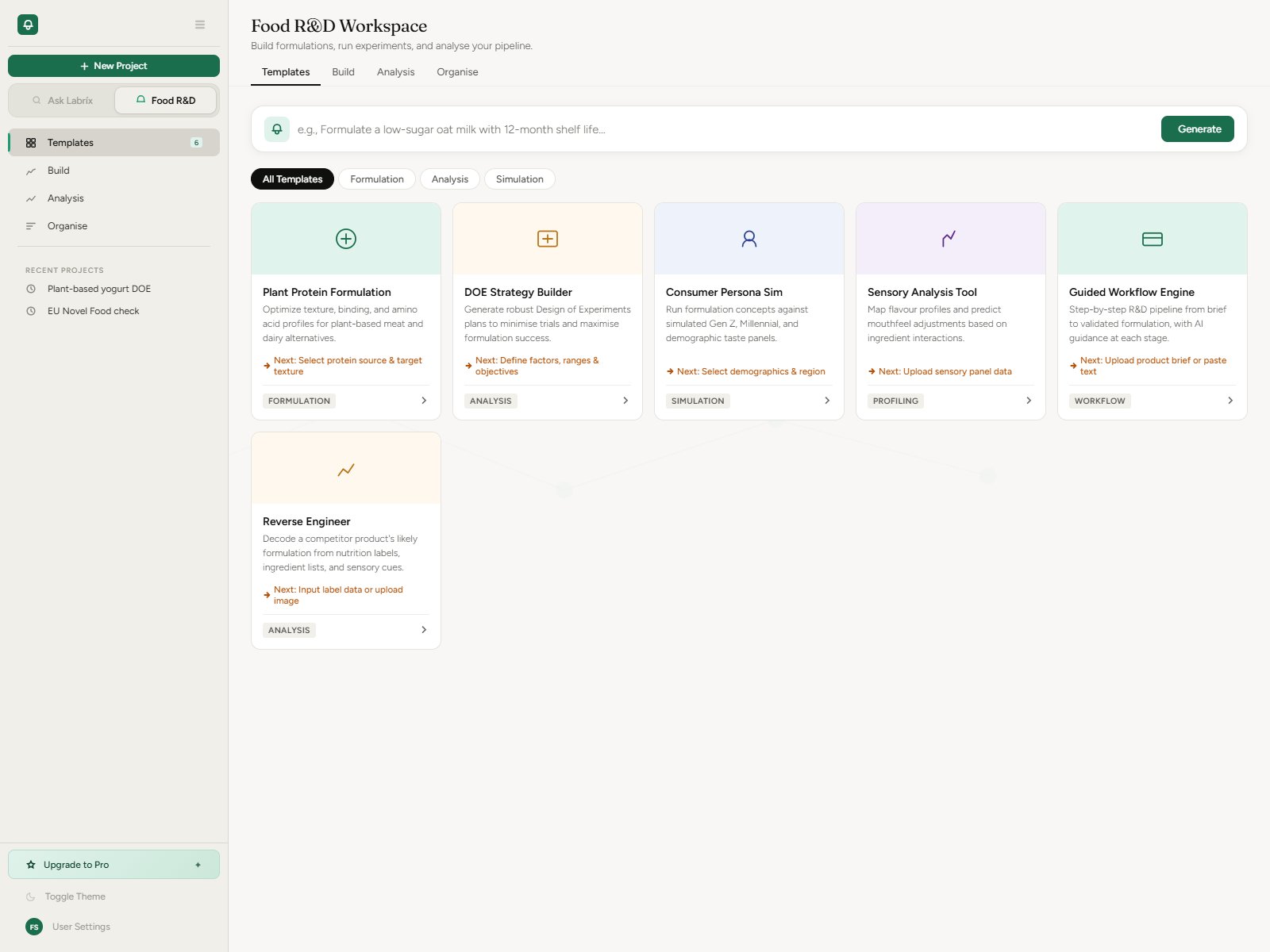
- Food R&D workspace: six templates, such as Plant Protein Formulation, DOE Strategy Builder, Sensory Analysis and Reverse Engineer, each showing the next step it leads to.
- Market Intel: cards tagged as feature, regulation, trend or market news.
- History split into threads, formulations and analyses, so past work is found by what it is.
What design rules guided the redesign?
- Fixed colour roles: green only for the primary action, amber for workflow hints, blue for information, purple for market content, red for destructive actions, neutral for active tabs.
- No false affordances: voice input stays visibly disabled until it works.
- Value visible within five seconds of opening the app.
- Destructive actions ask for confirmation instead of deleting directly.
- Navigation follows projects, the way R&D teams work, rather than a flat list of chats.
How do new users get started?
A three-step onboarding introduces Pickle, asks what the user wants to do, then tours the core tools. It can be skipped and is shown only once.
What does the visual system look like?
Fraunces for display type, Figtree for the interface and JetBrains Mono for data and formulas, with a full set of light and dark colour tokens so both themes follow the same colour roles.
Questions
What is Labrix?
Labrix is an AI workspace for food scientists and R&D teams, combining an assistant for food regulations and formulation with templates and tools for formulation and analysis.
What is Pickle in Labrix?
Pickle is the AI assistant inside Labrix. It answers questions about food regulations, formulation science and R&D workflows in the same workspace as the formulation and analysis tools.