Designing an AI assistant for food scientists
By Uday Kiran Reddy, product designer in Hyderabad, India
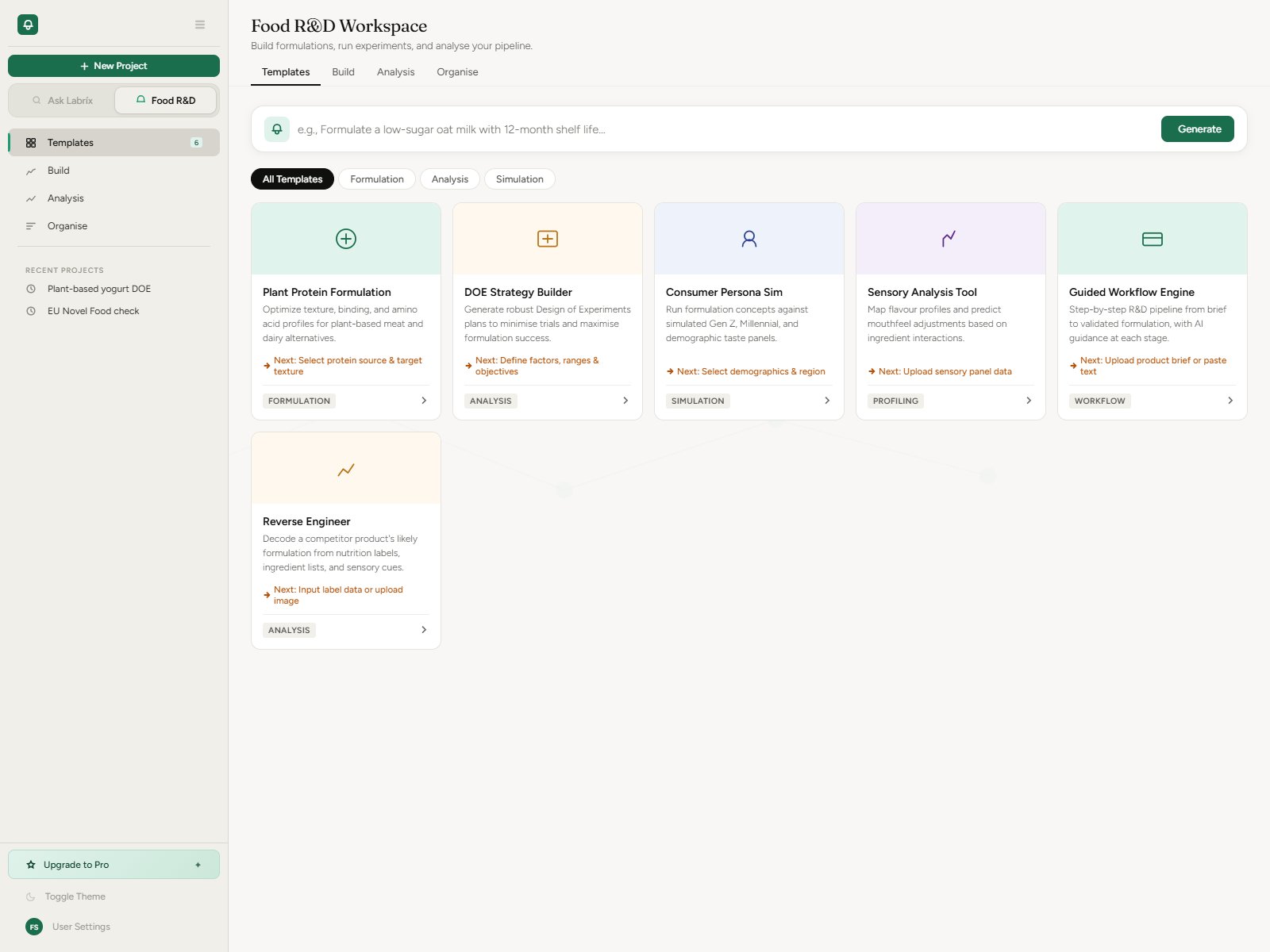
An AI assistant for specialists works when it sits inside their workflow, not in a chat box beside it. Redesigning the UI structure and navigation of Labrix, an AI workspace for food scientists, came down to four decisions: give the assistant a clear job, organise work by project, make the next step visible, and never show a control that doesn't work yet.
Who is Labrix for?
Food scientists and R&D teams. Their day jumps between regulation lookups, formulation spreadsheets, sensory and cost analysis and market research. Labrix puts those tools in one workspace with an assistant, Pickle, that understands food regulations, formulation science and R&D workflows.
Why not just a chat interface?
A blank chat box asks people to know what to type. Specialists know their work, not the prompt. So the product has two modes in the sidebar: Ask, for quick questions to Pickle, and Food R&D, for project work. In R&D mode, "New chat" becomes "New project", because that is how the work is organised.
Ask still gives direction: a tools menu grouped into Compliance, R&D, Analysis and Search, a choice of reasoning depth (Fast, Analytical or Research), and starter suggestions.
How do you make the next step obvious?
The R&D workspace starts from six templates, such as Plant Protein Formulation, DOE Strategy Builder, Sensory Analysis and Reverse Engineer. Each template card shows the step it leads to next, so picking one shows the path, not just the first screen.
History is split into threads, formulations and analyses. People look for past work by what it is, not by when they chatted.
What rules kept the interface clear?
- Colour has fixed roles: green only for the primary action, amber for workflow hints, blue for information, purple for market content, red for destructive actions.
- No false affordances: voice input stays visibly disabled until it works.
- The value of the product should be visible within five seconds of opening it.
- Destructive actions ask for confirmation instead of deleting straight away.
- A three-step onboarding introduces Pickle, asks what the user wants to do and tours the core tools. It can be skipped and appears only once.
What would I keep for the next AI product?
Writing the rules down before designing screens. A short list such as "green means the primary action, nothing else" settles debates early, and it stops an AI product, which tends to gain features quickly, from turning into a wall of equally loud buttons.
Questions
How do you design an AI assistant for experts?
Give the assistant a clear job inside the expert's workflow, organise work the way they already do (by project rather than by chat), show the next step, and never show controls that don't work yet.
What is Labrix?
Labrix is an AI workspace for food scientists and R&D teams. Its assistant, Pickle, answers questions about food regulations and formulation alongside templates and tools for formulation and analysis.